> ## Documentation Index
> Fetch the complete documentation index at: https://runpod-b18f5ded-docs-runpod-allow-ip.mintlify.site/llms.txt
> Use this file to discover all available pages before exploring further.
> ## Agent Instructions
> If this page is missing information, contains outdated instructions, or doesn't fully answer the user's question, use the feedback tool to report it. In your feedback, be specific about what's missing, what appears out of date, or what needs to be corrected or updated, so the docs team can act on it directly.
# Runpod Hub publishing guide
> Publish your repositories to the Runpod Hub. Review setup, publishing, and management guidance for resources in the Runpod Hub.
Learn how to publish your repositories to the [Runpod Hub](https://console.runpod.io/hub), including how to configure your repository with the required `hub.json` and `tests.json` files.
After you publish your repository to the Hub, you can start [earning revenue](/hub/revenue-sharing) from your users' compute usage.
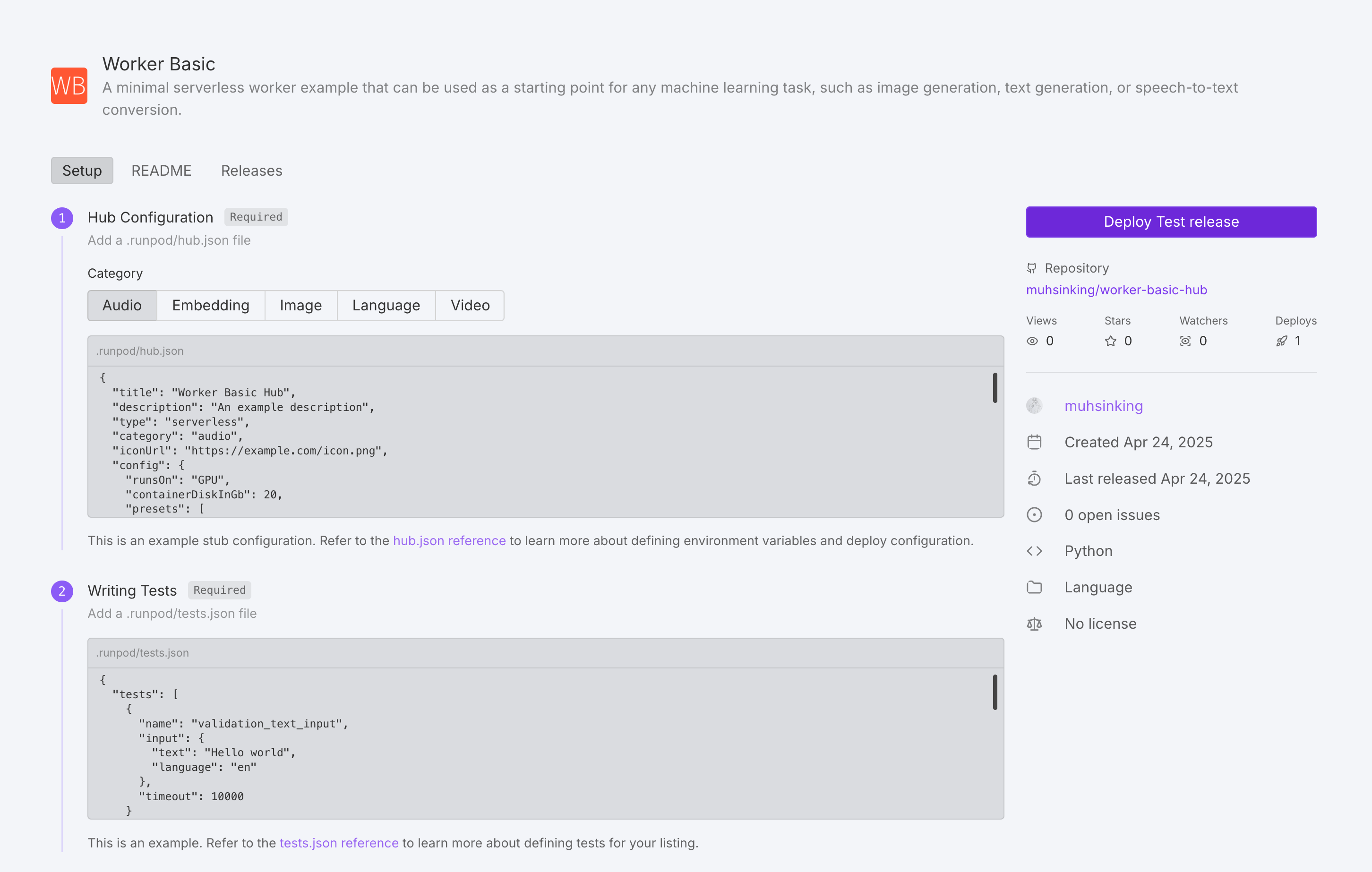 ## How to publish your repo
Follow these steps to add your repository to the Hub:
1. Navigate to the [Hub page](https://www.console.runpod.io/hub) in the Runpod console.
2. Under **Add your repo** click **Get Started**.
3. Enter your GitHub repo URL.
4. Follow the UI steps to add your repo to the Hub.
The Hub page will guide you through the following steps:
1. Create your `hub.json` and `tests.json` files.
2. Ensure your repository contains a `handler.py`, `Dockerfile`, and `README.md` file (in either the `.runpod` or root directory).
3. Create a new GitHub release (the Hub indexes releases, not commits).
4. (Optional) Add a Runpod Hub badge into your GitHub `README.md` file, so that users can instantly deploy your repo from GitHub.
After all the necessary files are in place and a release has been created, your repo will be marked "Pending" during building/testing. After testing is complete, the Runpod team will manually review the repo for publication.
## Update a repo
To update your repo on the Hub, just **create a new GitHub release**, and the Hub listing will be automatically indexed and built (usually within an hour).
## Required files
Aside from a working [Serverless implementation](/serverless/overview), every Hub repo requires two additional configuration files:
1. `hub.json` - Defines metadata and deployment settings for your repo.
2. `tests.json` - Specifies how to test your repo.
These files should be placed in the `.runpod` directory at the root of your repository. This directory takes precedence over the root directory, allowing you to override common files like `Dockerfile` and `README.md` specifically for the Hub.
## hub.json reference
The `hub.json` file defines how your listing appears and functions in the Hub.
You can build your `hub.json` from scratch, or use [this template](#hubjson-template) as a starting point.
### General metadata
| Field | Description | Required | Values |
| ------------- | ---------------------------------- | -------- | --------------------------------------------------------------- |
| `title` | Name of your tool | Yes | String |
| `description` | Brief explanation of functionality | Yes | String |
| `type` | Deployment type | Yes | `"serverless"` |
| `category` | Tool category | Yes | `"audio"`, `"embedding"`, `"language"`, `"video"`, or `"image"` |
| `iconUrl` | URL to tool icon | No | Valid URL |
| `config` | Runpod configuration | Yes | Object ([see below](#runpod-configuration)) |
### Runpod configuration
| Field | Description | Required | Values |
| --------------------- | ----------------------------------------------------------------------------------------------------------------------------------------- | --------------------------- | ---------------------------------------------------------------------------------------------------------------------------------------------------------------------------------------------------- |
| `runsOn` | Machine type | Yes | `"GPU"` or `"CPU"` |
| `endpointType` | Endpoint deployment type. When set to `"LB"`, users can deploy your listing as a Serverless endpoint or a Pod directly from the Hub page. | No | `"LB"` |
| `containerDiskInGb` | Container disk space allocation | Yes | Integer (GB) |
| `cpuFlavor` | CPU configuration | Only if `runsOn` is `"CPU"` | Valid CPU flavor string. For a complete list of available CPU flavors, see [CPU types](/references/cpu-types) |
| `gpuCount` | Number of GPUs | Only if `runsOn` is `"GPU"` | Integer |
| `gpuIds` | GPU pool specification | Only if `runsOn` is `"GPU"` | Comma-separated pool IDs (e.g., `"ADA_24"`) with optional GPU ID negations (e.g., `"-NVIDIA GeForce RTX 4090"`). For a list of GPU pools and IDs, see [GPU types](/references/gpu-types#gpu-pools). |
| `allowedCudaVersions` | Supported CUDA versions | No | Array of version strings |
| `env` | Environment variable definitions | No | Object ([see below](#environment-variables)) |
| `presets` | Default environment variable values | No | Object ([see below](#presets)) |
### Environment variables
Environment variables can be defined in several ways:
1. **Static variables**: Direct value assignment. For example:
```json theme={null}
{
"key": "API_KEY",
"value": "default-api-key-value"
}
```
2. **String inputs**: User-entered text fields. For example:
```json theme={null}
{
"key": "MODEL_PATH",
"input": {
"name": "Model path",
"type": "string",
"description": "Path to the model weights on disk",
"default": "/models/stable-diffusion-v1-5",
"advanced": false
}
}
```
3. **Hugging Face inputs:** Fields for model selection from Hugging Face Hub. For example:
```json theme={null}
{
"key": "HF_MODEL",
"input": {
"type": "huggingface",
"name": "Hugging Face Model",
"description": "Model organization/name as listed on Huggingface Hub",
"default": "runwayml/stable-diffusion-v1-5",
"required": true
}
}
```
4. **Option inputs**: User selected option fields. For example:
```json theme={null}
{
"key": "PRECISION",
"input": {
"name": "Model precision",
"type": "string",
"description": "The numerical precision for model inference",
"options": [
{"label": "Full Precision (FP32)", "value": "fp32"},
{"label": "Half Precision (FP16)", "value": "fp16"},
{"label": "8-bit Quantization", "value": "int8"}
],
"default": "fp16"
}
}
```
5. **Number Inputs**: User-entered numeric fields. For example:
```json theme={null}
{
"key": "MAX_TOKENS",
"input": {
"name": "Maximum tokens",
"type": "number",
"description": "Maximum number of tokens to generate",
"min": 32,
"max": 4096,
"default": 1024
}
}
```
6. **Boolean Inputs**: User-toggled boolean fields. For example:
```json theme={null}
{
"key": "USE_FLASH_ATTENTION",
"input": {
"type": "boolean",
"name": "Flash attention",
"description": "Enable Flash Attention for faster inference on supported GPUs",
"default": true,
"trueValue": "true",
"falseValue": "false"
}
}
```
Advanced options will be hidden by default. Hide an option by setting: `"advanced": true` .
### Presets
Presets allow you to define groups of default environment variable values. When a user deploys your repo, they'll be offered a dropdown menu with any preset options you've defined.
Here are some example presets:
```json theme={null}
"presets": [
{
"name": "Quality Optimized",
"defaults": {
"MODEL_NAME": "runpod-stable-diffusion-xl",
"INFERENCE_MODE": "quality",
"BATCH_SIZE": 1,
"ENABLE_CACHING": false,
"USE_FLASH_ATTENTION": true
}
},
{
"name": "Performance Optimized",
"defaults": {
"MODEL_NAME": "runpod-stable-diffusion-v1-5",
"INFERENCE_MODE": "fast",
"BATCH_SIZE": 8,
"ENABLE_CACHING": true,
"USE_FLASH_ATTENTION": true
}
}
]
```
## hub.json template
Here’s an example `hub.json` file that you can use as a starting point:
```json title="hub.json" theme={null}
{
"title": "Your Tool's Name",
"description": "A brief explanation of what your tool does",
"type": "serverless",
"category": "language",
"iconUrl": "https://your-icon-url.com/icon.png",
"config": {
"runsOn": "GPU",
"containerDiskInGb": 20,
"gpuCount": 1,
"gpuIds": "RTX A4000,-NVIDIA GeForce RTX 4090",
"allowedCudaVersions": [
"12.8", "12.7", "12.6", "12.5", "12.4",
"12.3", "12.2", "12.1", "12.0"
],
"presets": [
{
"name": "Preset Name",
"defaults": {
"STRING_ENV_VAR": "value1",
"INT_ENV_VAR": 10,
"BOOL_ENV_VAR": true
}
}
],
"env": [
{
"key": "STATIC_ENV_VAR",
"value": "static_value"
},
{
"key": "STRING_ENV_VAR",
"input": {
"name": "User-friendly Name",
"type": "string",
"description": "Description of this input",
"default": "default value",
"advanced": false
}
},
{
"key": "OPTION_ENV_VAR",
"input": {
"name": "Select Option",
"type": "string",
"description": "Choose from available options",
"options": [
{"label": "Option 1", "value": "value1"},
{"label": "Option 2", "value": "value2"}
],
"default": "value1"
}
},
{
"key": "INT_ENV_VAR",
"input": {
"name": "Numeric Value",
"type": "number",
"description": "Enter a number",
"min": 1,
"max": 100,
"default": 50
}
},
{
"key": "BOOL_ENV_VAR",
"input": {
"type": "boolean",
"name": "Enable Feature",
"description": "Toggle this feature on/off",
"default": false,
"trueValue": "enabled",
"falseValue": "disabled"
}
}
]
}
}
```
## tests.json reference
The `tests.json` file defines test cases to validate your tool's functionality. Tests are executed during the build step after [a release has been created](#publish-your-repo-to-the-runpod-hub). A test is considered valid by the Hub if the endpoint returns a [200 response](https://developer.mozilla.org/en-US/docs/Web/HTTP/Reference/Status/200).
You can build your `tests.json` from scratch, or use [this template](#testsjson-template) as a starting point.
### Test cases
Each test case should include:
| Field | Description | Required | Values |
| --------- | --------------------- | -------- | ---------------------- |
| `name` | Test identifier | Yes | String |
| `input` | Raw job input payload | Yes | Object |
| `timeout` | Max execution time | No | Integer (milliseconds) |
### Test environment configuration
| Field | Description | Required | Values |
| --------------------- | ----------------------------- | ------------------ | ---------------------------------------------------------------- |
| `gpuTypeId` | GPU type for testing | Only for GPU tests | Valid GPU ID (see [GPU types](/references/gpu-types)) |
| `gpuCount` | Number of GPUs | Only for GPU tests | Integer |
| `cpuFlavor` | CPU configuration for testing | Only for CPU tests | Valid CPU flavor string (see [CPU types](/references/cpu-types)) |
| `env` | Test environment variables | No | Array of key-value pairs |
| `allowedCudaVersions` | Supported CUDA versions | No | Array of version strings |
## tests.json template
Here’s an example `tests.json` file that you can use as a starting point:
```json title="tests.json" theme={null}
{
"tests": [
{
"name": "test_case_name",
"input": {
"param1": "value1",
"param2": "value2"
},
"timeout": 10000
}
],
"config": {
"gpuTypeId": "NVIDIA GeForce RTX 4090",
"gpuCount": 1,
"env": [
{
"key": "TEST_ENV_VAR",
"value": "test_value"
}
],
"allowedCudaVersions": [
"12.7", "12.6", "12.5", "12.4",
"12.3", "12.2", "12.1", "12.0", "11.7"
]
}
}
```
## How to publish your repo
Follow these steps to add your repository to the Hub:
1. Navigate to the [Hub page](https://www.console.runpod.io/hub) in the Runpod console.
2. Under **Add your repo** click **Get Started**.
3. Enter your GitHub repo URL.
4. Follow the UI steps to add your repo to the Hub.
The Hub page will guide you through the following steps:
1. Create your `hub.json` and `tests.json` files.
2. Ensure your repository contains a `handler.py`, `Dockerfile`, and `README.md` file (in either the `.runpod` or root directory).
3. Create a new GitHub release (the Hub indexes releases, not commits).
4. (Optional) Add a Runpod Hub badge into your GitHub `README.md` file, so that users can instantly deploy your repo from GitHub.
After all the necessary files are in place and a release has been created, your repo will be marked "Pending" during building/testing. After testing is complete, the Runpod team will manually review the repo for publication.
## Update a repo
To update your repo on the Hub, just **create a new GitHub release**, and the Hub listing will be automatically indexed and built (usually within an hour).
## Required files
Aside from a working [Serverless implementation](/serverless/overview), every Hub repo requires two additional configuration files:
1. `hub.json` - Defines metadata and deployment settings for your repo.
2. `tests.json` - Specifies how to test your repo.
These files should be placed in the `.runpod` directory at the root of your repository. This directory takes precedence over the root directory, allowing you to override common files like `Dockerfile` and `README.md` specifically for the Hub.
## hub.json reference
The `hub.json` file defines how your listing appears and functions in the Hub.
You can build your `hub.json` from scratch, or use [this template](#hubjson-template) as a starting point.
### General metadata
| Field | Description | Required | Values |
| ------------- | ---------------------------------- | -------- | --------------------------------------------------------------- |
| `title` | Name of your tool | Yes | String |
| `description` | Brief explanation of functionality | Yes | String |
| `type` | Deployment type | Yes | `"serverless"` |
| `category` | Tool category | Yes | `"audio"`, `"embedding"`, `"language"`, `"video"`, or `"image"` |
| `iconUrl` | URL to tool icon | No | Valid URL |
| `config` | Runpod configuration | Yes | Object ([see below](#runpod-configuration)) |
### Runpod configuration
| Field | Description | Required | Values |
| --------------------- | ----------------------------------------------------------------------------------------------------------------------------------------- | --------------------------- | ---------------------------------------------------------------------------------------------------------------------------------------------------------------------------------------------------- |
| `runsOn` | Machine type | Yes | `"GPU"` or `"CPU"` |
| `endpointType` | Endpoint deployment type. When set to `"LB"`, users can deploy your listing as a Serverless endpoint or a Pod directly from the Hub page. | No | `"LB"` |
| `containerDiskInGb` | Container disk space allocation | Yes | Integer (GB) |
| `cpuFlavor` | CPU configuration | Only if `runsOn` is `"CPU"` | Valid CPU flavor string. For a complete list of available CPU flavors, see [CPU types](/references/cpu-types) |
| `gpuCount` | Number of GPUs | Only if `runsOn` is `"GPU"` | Integer |
| `gpuIds` | GPU pool specification | Only if `runsOn` is `"GPU"` | Comma-separated pool IDs (e.g., `"ADA_24"`) with optional GPU ID negations (e.g., `"-NVIDIA GeForce RTX 4090"`). For a list of GPU pools and IDs, see [GPU types](/references/gpu-types#gpu-pools). |
| `allowedCudaVersions` | Supported CUDA versions | No | Array of version strings |
| `env` | Environment variable definitions | No | Object ([see below](#environment-variables)) |
| `presets` | Default environment variable values | No | Object ([see below](#presets)) |
### Environment variables
Environment variables can be defined in several ways:
1. **Static variables**: Direct value assignment. For example:
```json theme={null}
{
"key": "API_KEY",
"value": "default-api-key-value"
}
```
2. **String inputs**: User-entered text fields. For example:
```json theme={null}
{
"key": "MODEL_PATH",
"input": {
"name": "Model path",
"type": "string",
"description": "Path to the model weights on disk",
"default": "/models/stable-diffusion-v1-5",
"advanced": false
}
}
```
3. **Hugging Face inputs:** Fields for model selection from Hugging Face Hub. For example:
```json theme={null}
{
"key": "HF_MODEL",
"input": {
"type": "huggingface",
"name": "Hugging Face Model",
"description": "Model organization/name as listed on Huggingface Hub",
"default": "runwayml/stable-diffusion-v1-5",
"required": true
}
}
```
4. **Option inputs**: User selected option fields. For example:
```json theme={null}
{
"key": "PRECISION",
"input": {
"name": "Model precision",
"type": "string",
"description": "The numerical precision for model inference",
"options": [
{"label": "Full Precision (FP32)", "value": "fp32"},
{"label": "Half Precision (FP16)", "value": "fp16"},
{"label": "8-bit Quantization", "value": "int8"}
],
"default": "fp16"
}
}
```
5. **Number Inputs**: User-entered numeric fields. For example:
```json theme={null}
{
"key": "MAX_TOKENS",
"input": {
"name": "Maximum tokens",
"type": "number",
"description": "Maximum number of tokens to generate",
"min": 32,
"max": 4096,
"default": 1024
}
}
```
6. **Boolean Inputs**: User-toggled boolean fields. For example:
```json theme={null}
{
"key": "USE_FLASH_ATTENTION",
"input": {
"type": "boolean",
"name": "Flash attention",
"description": "Enable Flash Attention for faster inference on supported GPUs",
"default": true,
"trueValue": "true",
"falseValue": "false"
}
}
```
Advanced options will be hidden by default. Hide an option by setting: `"advanced": true` .
### Presets
Presets allow you to define groups of default environment variable values. When a user deploys your repo, they'll be offered a dropdown menu with any preset options you've defined.
Here are some example presets:
```json theme={null}
"presets": [
{
"name": "Quality Optimized",
"defaults": {
"MODEL_NAME": "runpod-stable-diffusion-xl",
"INFERENCE_MODE": "quality",
"BATCH_SIZE": 1,
"ENABLE_CACHING": false,
"USE_FLASH_ATTENTION": true
}
},
{
"name": "Performance Optimized",
"defaults": {
"MODEL_NAME": "runpod-stable-diffusion-v1-5",
"INFERENCE_MODE": "fast",
"BATCH_SIZE": 8,
"ENABLE_CACHING": true,
"USE_FLASH_ATTENTION": true
}
}
]
```
## hub.json template
Here’s an example `hub.json` file that you can use as a starting point:
```json title="hub.json" theme={null}
{
"title": "Your Tool's Name",
"description": "A brief explanation of what your tool does",
"type": "serverless",
"category": "language",
"iconUrl": "https://your-icon-url.com/icon.png",
"config": {
"runsOn": "GPU",
"containerDiskInGb": 20,
"gpuCount": 1,
"gpuIds": "RTX A4000,-NVIDIA GeForce RTX 4090",
"allowedCudaVersions": [
"12.8", "12.7", "12.6", "12.5", "12.4",
"12.3", "12.2", "12.1", "12.0"
],
"presets": [
{
"name": "Preset Name",
"defaults": {
"STRING_ENV_VAR": "value1",
"INT_ENV_VAR": 10,
"BOOL_ENV_VAR": true
}
}
],
"env": [
{
"key": "STATIC_ENV_VAR",
"value": "static_value"
},
{
"key": "STRING_ENV_VAR",
"input": {
"name": "User-friendly Name",
"type": "string",
"description": "Description of this input",
"default": "default value",
"advanced": false
}
},
{
"key": "OPTION_ENV_VAR",
"input": {
"name": "Select Option",
"type": "string",
"description": "Choose from available options",
"options": [
{"label": "Option 1", "value": "value1"},
{"label": "Option 2", "value": "value2"}
],
"default": "value1"
}
},
{
"key": "INT_ENV_VAR",
"input": {
"name": "Numeric Value",
"type": "number",
"description": "Enter a number",
"min": 1,
"max": 100,
"default": 50
}
},
{
"key": "BOOL_ENV_VAR",
"input": {
"type": "boolean",
"name": "Enable Feature",
"description": "Toggle this feature on/off",
"default": false,
"trueValue": "enabled",
"falseValue": "disabled"
}
}
]
}
}
```
## tests.json reference
The `tests.json` file defines test cases to validate your tool's functionality. Tests are executed during the build step after [a release has been created](#publish-your-repo-to-the-runpod-hub). A test is considered valid by the Hub if the endpoint returns a [200 response](https://developer.mozilla.org/en-US/docs/Web/HTTP/Reference/Status/200).
You can build your `tests.json` from scratch, or use [this template](#testsjson-template) as a starting point.
### Test cases
Each test case should include:
| Field | Description | Required | Values |
| --------- | --------------------- | -------- | ---------------------- |
| `name` | Test identifier | Yes | String |
| `input` | Raw job input payload | Yes | Object |
| `timeout` | Max execution time | No | Integer (milliseconds) |
### Test environment configuration
| Field | Description | Required | Values |
| --------------------- | ----------------------------- | ------------------ | ---------------------------------------------------------------- |
| `gpuTypeId` | GPU type for testing | Only for GPU tests | Valid GPU ID (see [GPU types](/references/gpu-types)) |
| `gpuCount` | Number of GPUs | Only for GPU tests | Integer |
| `cpuFlavor` | CPU configuration for testing | Only for CPU tests | Valid CPU flavor string (see [CPU types](/references/cpu-types)) |
| `env` | Test environment variables | No | Array of key-value pairs |
| `allowedCudaVersions` | Supported CUDA versions | No | Array of version strings |
## tests.json template
Here’s an example `tests.json` file that you can use as a starting point:
```json title="tests.json" theme={null}
{
"tests": [
{
"name": "test_case_name",
"input": {
"param1": "value1",
"param2": "value2"
},
"timeout": 10000
}
],
"config": {
"gpuTypeId": "NVIDIA GeForce RTX 4090",
"gpuCount": 1,
"env": [
{
"key": "TEST_ENV_VAR",
"value": "test_value"
}
],
"allowedCudaVersions": [
"12.7", "12.6", "12.5", "12.4",
"12.3", "12.2", "12.1", "12.0", "11.7"
]
}
}
```